The official instructions appear below. The extra tips, challenges, and skill ideas come from the supplied player guide and may not describe every game feature. The game’s own help screen is the final word on its rules.
At a glance
Game: Sudoku: Living Worlds Created and published by: ZBANI Game Studio Players: Single player Difficulty: Easy, Medium, Hard, or Expert Backgrounds: 16 animated living worlds Price: Free to play in your browser.
How to play
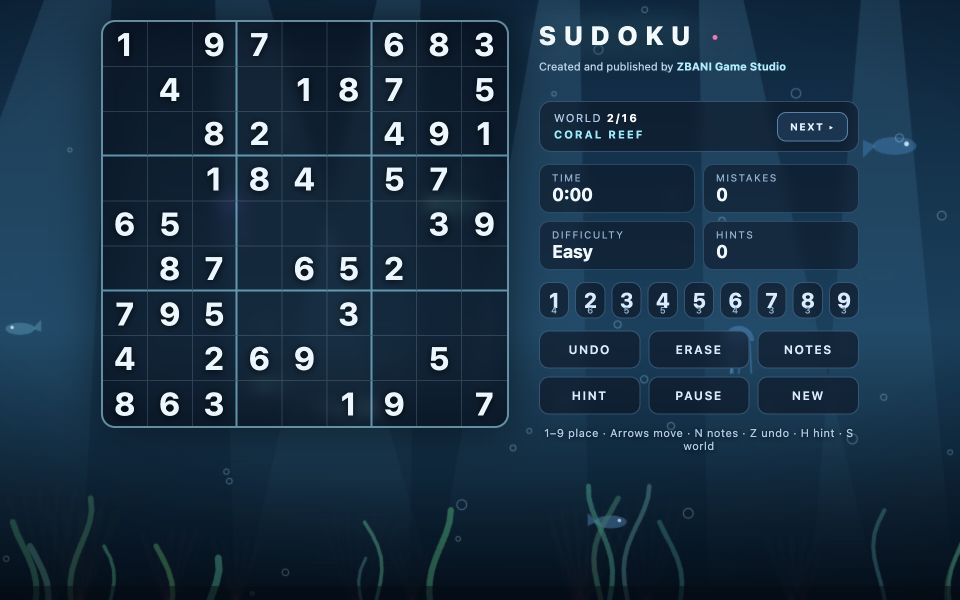
Choose a difficulty to start a new puzzle. Select an empty cell, then choose a digit from 1 to 9 using the on-screen keypad or your keyboard. Each row, column, and 3×3 box must contain all nine digits without repeating a number. The starting clues cannot be changed. Use Notes to mark possible numbers, Undo or Erase to correct an entry, and Hint if you need help. Finish the whole grid correctly to see the SOLVED screen.
Easy steps for beginners
- Select Load & play free, then choose Easy, Medium, Hard, or Expert.
- Tap or click an empty cell and choose a number from 1 to 9.
- Check its row, column, and 3×3 box before placing your number.
- Use Notes for possibilities and Hint when you get stuck.
- Fill the entire grid correctly to complete the puzzle.
Controls & buttons
Click or tap a cell — select it. Number keys 1–9 / on-screen keypad — enter a number. Arrow keys — move your selection around the board. Notes / N — toggle candidate notes instead of final answers. Undo / Z — undo a recent cell edit. Erase / Backspace / Delete / 0 — clear the selected editable cell. Hint / H — fill the selected empty cell correctly, or another empty cell if needed. Pause / P / Escape — pause or resume; the paused grid is blurred. Next / S — switch to another animated world. New — choose a difficulty and start a fresh puzzle. Use the ZBANI Full screen button to give the board more space.
Your goal & how to win
Fill all 81 cells correctly. Every row, column, and 3×3 box must contain the numbers 1–9 without repetitions. The game generates puzzles with a unique solution. Difficulty levels aim for 45 starting clues on Easy, 36 on Medium, 30 on Hard, and 25 on Expert, although the generator may keep extra clues to preserve uniqueness. A wrong answer increases the mistake counter; mistakes do not end the game. On completion, the game shows your difficulty, time, mistakes, and hints used.
Tips & strategies
Start with rows, columns, or boxes that have the most numbers filled in. Look for an empty cell that has only one possible number. Turn on Notes when several numbers are possible, then remove candidates as the grid develops. Use Undo or Erase to correct an answer instead of starting the puzzle over. Try Easy while learning the rules, then move up when you feel comfortable. Change the world background without losing your current puzzle. Pause if you need a break; the game also pauses when its document becomes hidden.
Quick questions
Who made this game? Sudoku: Living Worlds belongs to ZBANI Game Studio and is created and published under the ZBANI brand.
Can I use hints? Yes. Hint fills a correct number and increases the hint counter.
Can I return to my puzzle later? The game saves puzzle progress locally in this browser, including notes, time, and background choice. Clearing browser storage can remove that save.
Can I play on a phone? Yes. Select a cell and use the on-screen number keypad.
Do I need an account or download? No. The game is free to play directly in your browser.
More games to explore
Play more games created by ZBANI Game Studio: Play this game ↗ Play this game ↗ Play this game ↗ Play this game ↗
About this guide
Instructions based on the supplied Sudoku Living Worlds game interface and code, including its puzzle generator, cell input, hints, notes, timer, local save, and background controls. Game and publisher: ZBANI Game Studio, operated by MEGAVAST LTD, Cyprus.
Original file: Sudoku Living Worlds game source and interface
Sudoku: Living Worlds is an original game created and published by ZBANI Game Studio, operated by MEGAVAST LTD, Cyprus. This guide describes the actual rules and controls in the supplied game.